
If you’re running a B2B website, chances are a large portion of your traffic leaves without ever filling out a form. No demo request, no signup just gone.
But here’s the thing: those visitors aren’t always random. Many of them are companies actively researching solutions like yours.
That’s where Leadfeeder steps in.
Instead of letting anonymous traffic slip away, this lead generation tool identifies the companies visiting your website and gives your sales team actionable insights to turn those visits into real opportunities.
In this Leadfeeder review, we’ll break down how it works, its features, pricing, pros and cons, and whether it’s actually worth using for B2B sales.
What Is Leadfeeder?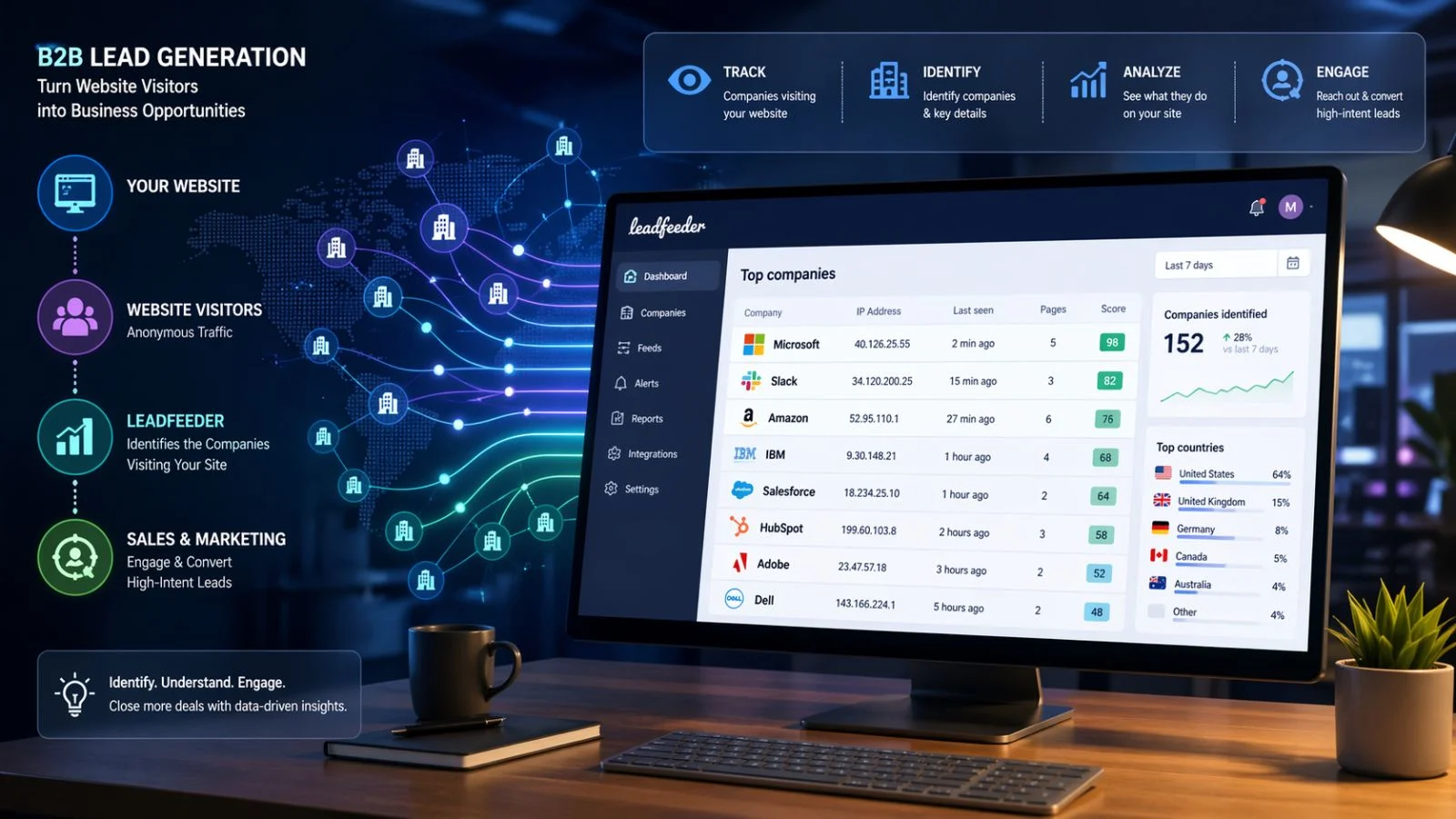
Leadfeeder is a lead generation tool designed specifically for B2B sales teams. It helps you track which companies are visiting your website even if they don’t fill out any forms.
It works by connecting with your website analytics (like Google Analytics) and matching visitor IP addresses to company data. The result? A list of businesses that have already shown interest in what you offer.
Instead of chasing cold leads, you get warm prospects who’ve already interacted with your brand.
How Leadfeeder Works
At a high level, Leadfeeder turns anonymous website traffic into identifiable business leads.
Here’s how the process works:
First, it tracks visitors coming to your website. Then, it identifies the companies behind those visits using IP matching. After that, it enriches the data with company details like industry, size, and location.
Finally, it shows you:
- Which companies visited your site
- What pages they viewed
- How often they returned
- How engaged they are
This gives your B2B sales team a clear signal of buying intent—something traditional analytics tools don’t provide.
Key Features of Leadfeeder
1. Company Identification
The core feature of Leadfeeder is its ability to reveal which companies are visiting your website.
You’re no longer guessing who might be interested—you get actual company names and profiles.
2. Lead Scoring and Filtering
Not every visitor is worth your time. Leadfeeder lets you filter leads based on behavior, location, company size, and more.
This helps your B2B sales team focus only on high-intent prospects.
3. Website Behavior Tracking
You can see exactly what each company did on your site pages visited, time spent, and visit frequency.
This makes your outreach smarter and more personalized.
4. CRM Integrations
Leadfeeder integrates with popular CRM tools like HubSpot and Salesforce, making it easy to push leads directly into your sales pipeline.
No manual work, no messy data transfers.
5. Email Alerts
You can set up alerts for when high-value companies visit your website.
This allows your sales team to act fast sometimes while the prospect is still researching.
How Leadfeeder Helps B2B Sales Teams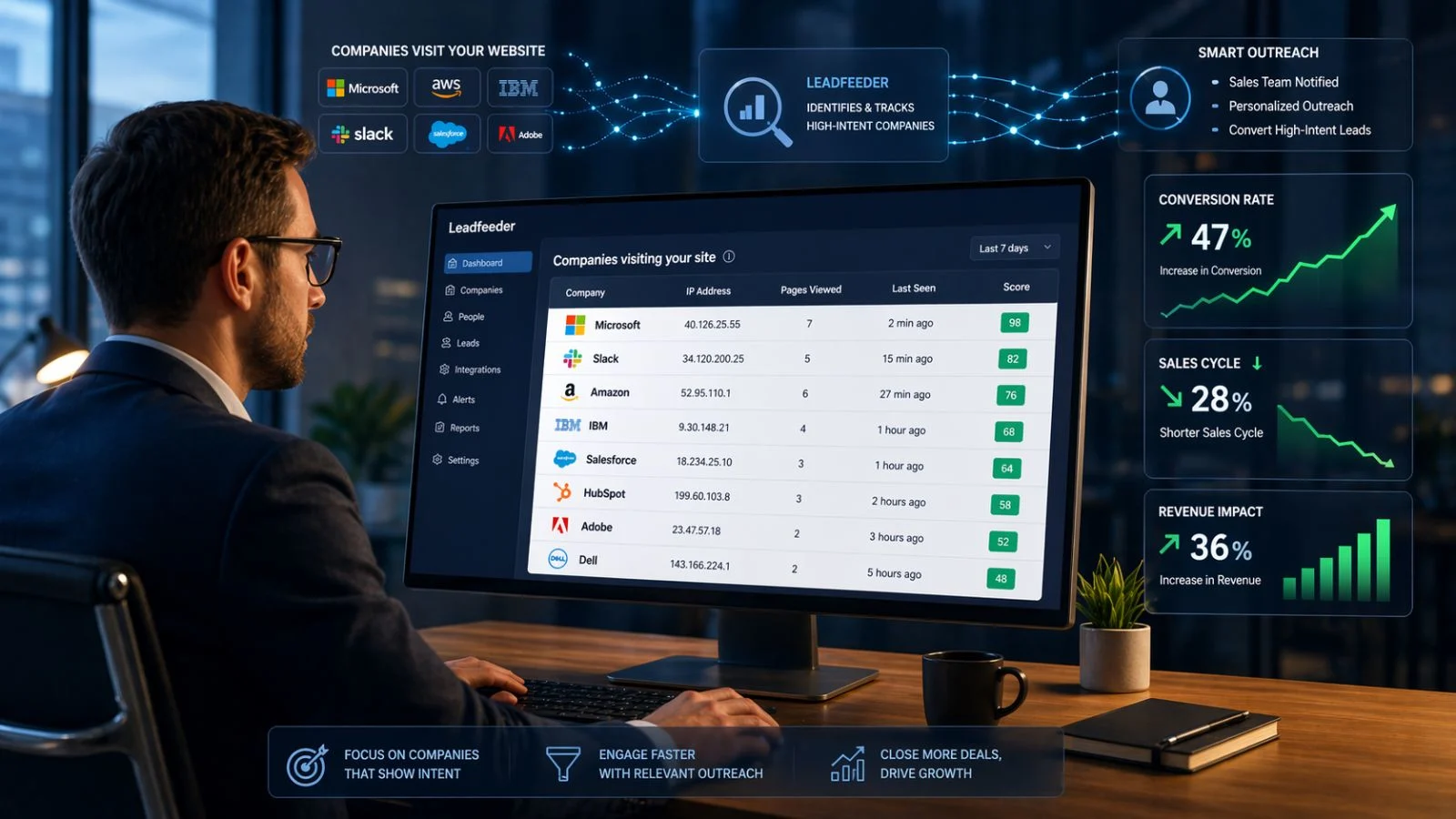
Most B2B sales strategies rely heavily on outbound efforts cold emails, calls, and ads.
Leadfeeder flips that model.
Instead of guessing who might be interested, you focus on companies that have already shown intent.
This leads to:
- Better conversion rates
- More relevant outreach
- Shorter sales cycles
Your sales team isn’t just working harder they’re working smarter.
Pros and Cons of Leadfeeder
Pros
Leadfeeder is easy to set up and doesn’t require technical expertise. The interface is clean, and the data is actionable right away.
It helps uncover hidden opportunities that traditional analytics tools completely miss.
It also aligns marketing and B2B sales teams by giving both access to the same insights.
Cons
It doesn’t identify individual users only companies. So you’ll still need to find the right contact within the organization.
Accuracy can vary depending on traffic type (VPNs, remote users, etc.).
And while the free plan exists, most useful features are locked behind paid tiers.
Leadfeeder Pricing Overview
Leadfeeder offers a free version with limited data and features, which is good for testing the platform.
The paid plans unlock:
- More identified companies
- Advanced filtering
- CRM integrations
- Better data retention
Pricing typically scales based on website traffic volume, making it flexible for different business sizes.
Who Should Use Leadfeeder?
Leadfeeder is best suited for:
- B2B companies with consistent website traffic
- Sales teams looking to improve lead quality
- Marketing teams focused on conversion optimization
- SaaS, agencies, and service-based businesses
If your audience is primarily individual consumers, this tool won’t be as effective.
Is Leadfeeder Worth It? (Final Verdict)
So, is Leadfeeder the best lead generation tool for B2B sales?
It depends but for most B2B businesses, it’s a strong yes.
If you already get traffic but struggle to convert visitors into leads, Leadfeeder fills that gap perfectly. It gives visibility into who’s interested and helps your team act on it.
It’s not a magic solution you still need solid outreach and sales processes but it gives you a serious advantage.
Leadfeeder Pricing Plans (Detailed Breakdown)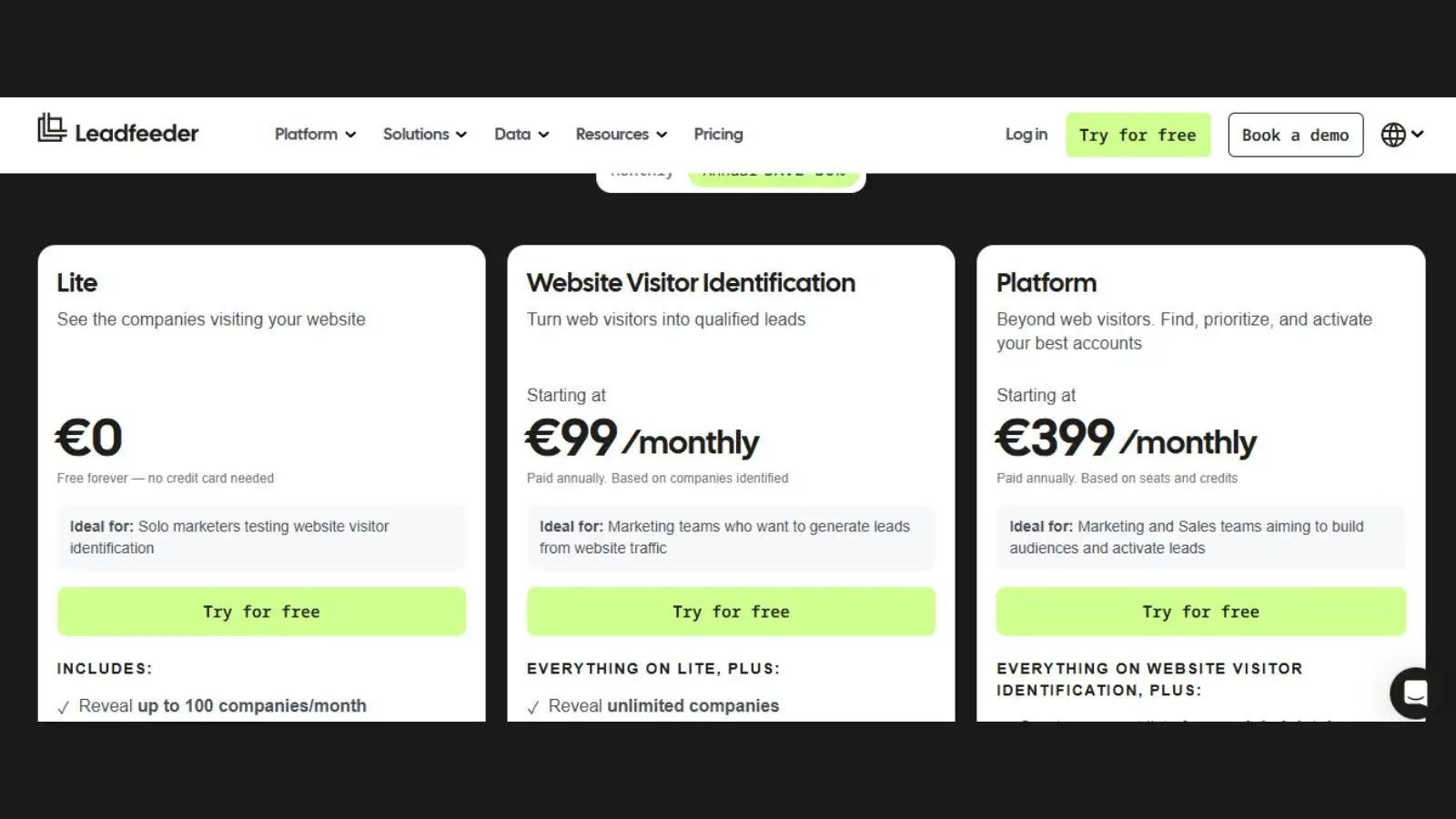
Let’s break this down clearly, because pricing is where most people decide.
Leadfeeder uses a usage-based pricing model, meaning your cost depends on how many companies visit your website.
1. Free Plan (Lite)
- Price: €0/month
- Identifies up to 100 companies/month
- 7-day data history
- Limited company and contact details
This is good for testing, but not enough for serious B2B sales.
2. Website Visitor Identification Plan (Paid)
- Starts at €99/month (or ~$99/month)
- Pricing increases based on traffic volume
What you get:
- Unlimited company identification
- Full visitor history
- CRM integrations
- Lead scoring and filtering
- Alerts for high-intent visitors
Pricing scales like this:
- ~€99/month → up to 50 companies
- ~€119–€299/month → mid-range traffic
- ~€700+ → high-traffic websites
So the more traffic you have, the more you pay but also the more value you get.
3. Platform Plan (Advanced / Enterprise)
- Starts around €399/month
Includes everything above, plus:
- Access to a massive database (60M+ companies)
- Advanced prospecting filters
- AI enrichment
- Built-in outbound targeting
This is for serious B2B sales teams doing account-based marketing.
💡 Key Pricing Insight
Leadfeeder is not a flat subscription tool it scales with your growth.
That’s great if:
- You already have traffic
- You’re converting leads into revenue
But if your site traffic is low, it may feel expensive early on.
Leadfeeder vs Other Lead Generation Tools
To really understand its value, you need context.
Most lead generation tools fall into two categories:
- Outbound tools (Apollo, ZoomInfo) → you search for leads
- Inbound intelligence tools (Leadfeeder) → leads come to you
Leadfeeder stands out because it focuses on intent-based data.
Instead of cold outreach, you’re targeting companies already interested in your product.
That’s a big shift in how B2B sales works.
Real Use Cases: When Leadfeeder Works Best
This tool isn’t for everyone but when it fits, it works really well.
1. SaaS Companies
If you’re running a SaaS product, visitors are constantly researching.
Leadfeeder helps identify:
- Trial users who didn’t convert
- Returning visitors showing buying intent
2. Agencies
Marketing and consulting agencies can see which companies are checking their services.
This makes outreach feel warm instead of cold.
3. High-Traffic B2B Websites
If you’re getting consistent traffic but low conversions, Leadfeeder fills the gap.
It shows you opportunities you didn’t even know existed.
Leadfeeder Review: Real-World Limitations You Should Know
No tool is perfect and ignoring this part would be misleading.
1. Not All Traffic Is Identifiable
Some visitors (VPN users, remote workers, privacy tools) won’t be tracked accurately.
2. No Direct Contact Details (Sometimes)
You often get company-level data, not decision-makers.
You’ll still need tools like LinkedIn or email finders.
- Works Best With Existing Traffic
If your website gets very low traffic, this tool won’t magically generate leads.
It enhances what you already have it doesn’t replace marketing.
Leadfeeder vs Google Analytics: What’s the Difference?
A lot of people think: “Can’t I just use Google Analytics?”
Not really.
Google Analytics tells you:
- How many people visited
- Where they came from
- What pages they viewed
Leadfeeder tells you:
- Which companies visited
- What they’re interested in
- How likely they are to convert
That’s the key difference data vs actionable leads.
How to Get the Most Out of Leadfeeder
Using Leadfeeder alone isn’t enough. The real value comes from how you use it.
Here’s what actually works:
- Reach out within 24–48 hours of a visit
- Personalize messages based on pages viewed
- Combine with CRM + email outreach
- Focus only on high-intent companies
This is where most B2B sales teams see the biggest results.
Also Read,
Conclusion
So, is Leadfeeder the best lead generation tool for B2B sales?
For most B2B businesses, it’s one of the smartest tools you can add to your stack—but only if you use it the right way.
It doesn’t replace your marketing or outbound efforts. Instead, it strengthens them by showing you who is already interested. That shift from cold guessing to warm targeting is where the real value lies.
If your website is getting consistent traffic but conversions are low, Leadfeeder can unlock hidden opportunities and give your sales team a clear direction on where to focus.
On the other hand, if you’re just starting out with minimal traffic, you may need to build your audience first before this tool delivers strong ROI.
Bottom line:
Leadfeeder isn’t magic but for B2B sales teams that know how to act on intent data, it can be a serious growth driver.
FAQs
1. What does Leadfeeder actually do?
Leadfeeder identifies companies visiting your website and shows their behavior, helping you turn anonymous traffic into actionable B2B sales leads.
2. Is Leadfeeder worth it for small businesses?
Yes, but only if you have consistent website traffic. Without traffic, the value of any lead generation tool including Leadfeeder drops significantly.
3. How accurate is Leadfeeder?
Leadfeeder is generally accurate at the company level, but it may miss some visitors due to VPNs, remote work setups, or privacy restrictions.
4.Can Leadfeeder replace cold outreach?
Not entirely. It reduces reliance on cold outreach by giving you warm leads, but you’ll still need a solid outreach strategy to convert them.
5. Does Leadfeeder show individual visitor data?
No, it focuses on company-level insights rather than identifying specific individuals.
6. Is there a free version of Leadfeeder?
Yes, there is a free plan with limited features. It’s useful for testing before committing to a paid plan.